Using Browser console for debugging Test Driven JavaScript

One of the great things about TTD is the ability to track the success of each action in the application, whether it was user initiated or an automatic application function. For me, so far, one of the best ways to do this is using the debug console built into the browser. Each browser is specific, of course, but there is a simple technique to use the code cross browser without generating errors.

if(!window.console){ window.console = {log: function(){} }; }

An example of usage is in my form content wizard plugin.

  // look into step for custom button, then add the "begin" button to the first step if not there.
 if(!beginbuttonclass){ 
var beginbuttonclass=""; 
console.log('Note from content display wizard plugin: beginbuttonclass has not been defined. See documentation for more information.');}

To see if an external  script is loaded sucessfully, you need to have a variable that the script would provide, then check for it. For example here we will try see if  I have successfully  loaded JQuery from the cdn: (code.jquery.com/jquery-1.10.2.min.js)

try {
     if($()){console.log("Message from slider admin: Jquery loaded... now executing document load functions...");} 
} catch (e) { console.log("Message from slider admin, error loading jquery..."+e.message); }


CSS Color chart

Here is a chart of css colors with common names avaible in most browsers.

HTML name Hex code R   G   B Decimal code R   G   B
Pink colors
Pink FF C0 CB 255 192 203
LightPink FF B6 C1 255 182 193
HotPink FF 69 B4 255 105 180
DeepPink FF 14 93 255  20 147
PaleVioletRed DB 70 93 219 112 147
MediumVioletRed C7 15 85 199  21 133
Red colors
LightSalmon FF A0 7A 255 160 122
Salmon FA 80 72 250 128 114
DarkSalmon E9 96 7A 233 150 122
LightCoral F0 80 80 240 128 128
IndianRed CD 5C 5C 205  92  92
Crimson DC 14 3C 220  20  60
FireBrick B2 22 22 178  34  34
DarkRed 8B 00 00 139   0   0
Red FF 00 00 255   0   0
Orange colors
OrangeRed FF 45 00 255  69   0
Tomato FF 63 47 255  99  71
Coral FF 7F 50 255 127  80
DarkOrange FF 8C 00 255 140   0
Orange FF A5 00 255 165   0
Gold FF D7 00 255 215   0
Yellow colors
Yellow FF FF 00 255 255   0
LightYellow FF FF E0 255 255 224
LemonChiffon FF FA CD 255 250 205
LightGoldenrodYellow FA FA D2 250 250 210
PapayaWhip FF EF D5 255 239 213
Moccasin FF E4 B5 255 228 181
PeachPuff FF DA B9 255 218 185
PaleGoldenrod EE E8 AA 238 232 170
Khaki F0 E6 8C 240 230 140
DarkKhaki BD B7 6B 189 183 107
Brown colors
Cornsilk FF F8 DC 255 248 220
BlanchedAlmond FF EB CD 255 235 205
Bisque FF E4 C4 255 228 196
NavajoWhite FF DE AD 255 222 173
Wheat F5 DE B3 245 222 179
BurlyWood DE B8 87 222 184 135
Tan D2 B4 8C 210 180 140
RosyBrown BC 8F 8F 188 143 143
SandyBrown F4 A4 60 244 164  96
Goldenrod DA A5 20 218 165  32
DarkGoldenrod B8 86 0B 184 134  11
Peru CD 85 3F 205 133  63
Chocolate D2 69 1E 210 105  30
SaddleBrown 8B 45 13 139  69  19
Sienna A0 52 2D 160  82  45
Brown A5 2A 2A 165  42  42
Maroon 80 00 00 128   0   0
HTML name Hex code R   G   B Decimal code – R   G   B
Green colors
DarkOliveGreen 55 6B 2F  85 107  47
Olive 80 80 00 128 128   0
OliveDrab 6B 8E 23 107 142  35
YellowGreen 9A CD 32 154 205  50
LimeGreen 32 CD 32  50 205  50
Lime 00 FF 00   0 255   0
LawnGreen 7C FC 00 124 252   0
Chartreuse 7F FF 00 127 255   0
GreenYellow AD FF 2F 173 255  47
SpringGreen 00 FF 7F   0 255 127
MediumSpringGreen 00 FA 9A   0 250 154
LightGreen 90 EE 90 144 238 144
PaleGreen 98 FB 98 152 251 152
DarkSeaGreen 8F BC 8F 143 188 143
MediumSeaGreen 3C B3 71  60 179 113
SeaGreen 2E 8B 57  46 139  87
ForestGreen 22 8B 22  34 139  34
Green 00 80 00   0 128   0
DarkGreen 00 64 00   0 100   0
Cyan colors
MediumAquamarine 66 CD AA 102 205 170
Aqua 00 FF FF   0 255 255
Cyan 00 FF FF   0 255 255
LightCyan E0 FF FF 224 255 255
PaleTurquoise AF EE EE 175 238 238
Aquamarine 7F FF D4 127 255 212
Turquoise 40 E0 D0  64 224 208
MediumTurquoise 48 D1 CC  72 209 204
DarkTurquoise 00 CE D1   0 206 209
LightSeaGreen 20 B2 AA  32 178 170
CadetBlue 5F 9E A0  95 158 160
DarkCyan 00 8B 8B   0 139 139
Teal 00 80 80   0 128 128
Blue colors
LightSteelBlue B0 C4 DE 176 196 222
PowderBlue B0 E0 E6 176 224 230
LightBlue AD D8 E6 173 216 230
SkyBlue 87 CE EB 135 206 235
LightSkyBlue 87 CE FA 135 206 250
DeepSkyBlue 00 BF FF   0 191 255
DodgerBlue 1E 90 FF  30 144 255
CornflowerBlue 64 95 ED 100 149 237
SteelBlue 46 82 B4  70 130 180
RoyalBlue 41 69 E1  65 105 225
Blue 00 00 FF   0   0 255
MediumBlue 00 00 CD   0   0 205
DarkBlue 00 00 8B   0   0 139
Navy 00 00 80   0   0 128
MidnightBlue 19 19 70  25  25 112
HTML name Hex code R   G   B Decimal code R   G   B
Purple colors
Lavender E6 E6 FA 230 230 250
Thistle D8 BF D8 216 191 216
Plum DD A0 DD 221 160 221
Violet EE 82 EE 238 130 238
Orchid DA 70 D6 218 112 214
Fuchsia FF 00 FF 255   0 255
Magenta FF 00 FF 255   0 255
MediumOrchid BA 55 D3 186  85 211
MediumPurple 93 70 DB 147 112 219
BlueViolet 8A 2B E2 138  43 226
DarkViolet 94 00 D3 148   0 211
DarkOrchid 99 32 CC 153  50 204
DarkMagenta 8B 00 8B 139   0 139
Purple 80 00 80 128   0 128
Indigo 4B 00 82  75   0 130
DarkSlateBlue 48 3D 8B  72  61 139
SlateBlue 6A 5A CD 106  90 205
MediumSlateBlue 7B 68 EE 123 104 238
White colors
White FF FF FF 255 255 255
Snow FF FA FA 255 250 250
Honeydew F0 FF F0 240 255 240
MintCream F5 FF FA 245 255 250
Azure F0 FF FF 240 255 255
AliceBlue F0 F8 FF 240 248 255
GhostWhite F8 F8 FF 248 248 255
WhiteSmoke F5 F5 F5 245 245 245
Seashell FF F5 EE 255 245 238
Beige F5 F5 DC 245 245 220
OldLace FD F5 E6 253 245 230
FloralWhite FF FA F0 255 250 240
Ivory FF FF F0 255 255 240
AntiqueWhite FA EB D7 250 235 215
Linen FA F0 E6 250 240 230
LavenderBlush FF F0 F5 255 240 245
MistyRose FF E4 E1 255 228 225
Gray/Grey/Black colors
Gainsboro DC DC DC 220 220 220
LightGray D3 D3 D3 211 211 211
Silver C0 C0 C0 192 192 192
DarkGray A9 A9 A9 169 169 169
Gray 80 80 80 128 128 128
DimGray 69 69 69 105 105 105
LightSlateGray 77 88 99 119 136 153
SlateGray 70 80 90 112 128 144
DarkSlateGray 2F 4F 4F  47  79  79
Black 00 00 00   0   0   0

Graduation, Diploma and Document Application Form

logo for diploma application

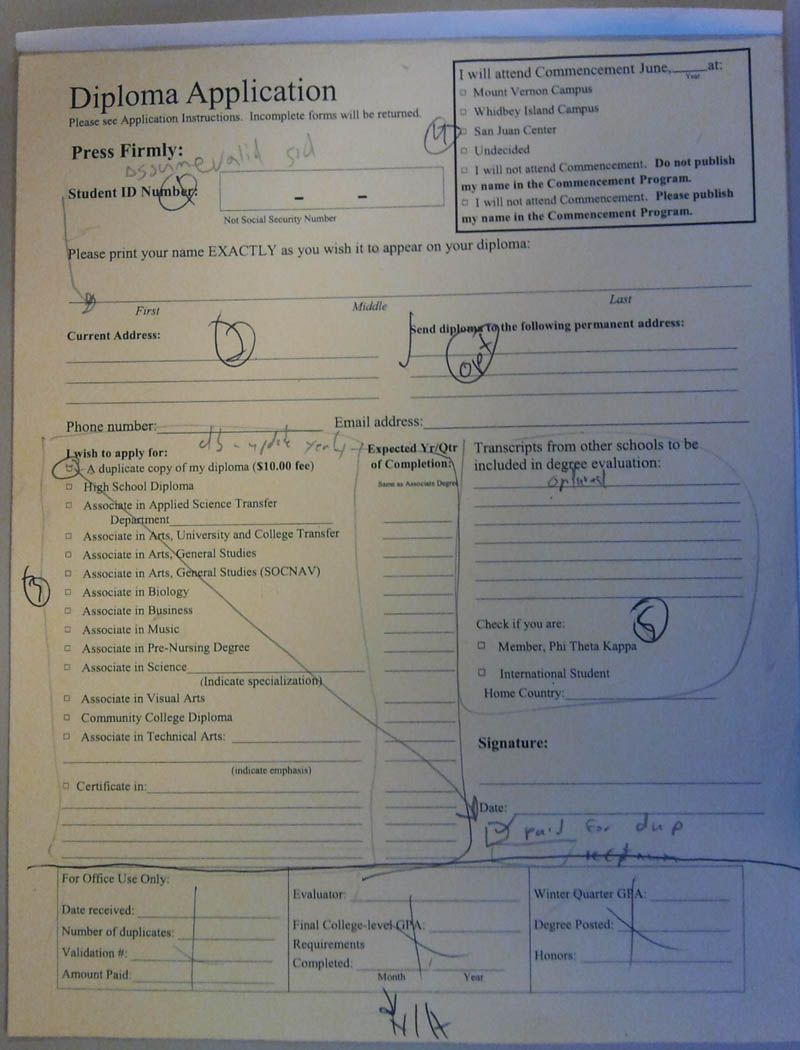
One of my first jobs when helping SVC move from paper to digital workflow was to create a way for students to apply for graduation. This is a significant achievement in for Skagit Valley College because because these paper forms have been used by every graduating student since 1926!

Paper Graduation Application Form

The process toward the end result would not be as effective if I didn’t use my project management cloud to outline the project, make task lists and keep track of progress.
The following would be a sample of the task lists I created for this project…

  1. Meet with client and get project scope.
  2. Create all the I/A Design documents including project brief, user case studies, flowcharts and wireframes.
  3. Obtain approval of designs from supervisors and clients.
  4. Develop the application in an Agile Test Driven Development Environment using the Model View Controller programming technique.
  5. Run user tests and edge case scenarios.
  6. Deploy application in student toolbox.

While developing the Diploma and Document Application Form I have come up with  an algorithm to plug into any form or content that will transform it into a paperless web application with the following features:

  • To a developers point of view the best thing is Automation!
  • Content organized and displayed to the user in an easy to navigate style.
  • Client side validation for form elements when and where needed.
  • Form summary and easy ability to make changes before submit.
  • Takes care of form data submission using Ajax to hand the data on a silver platter to any api.

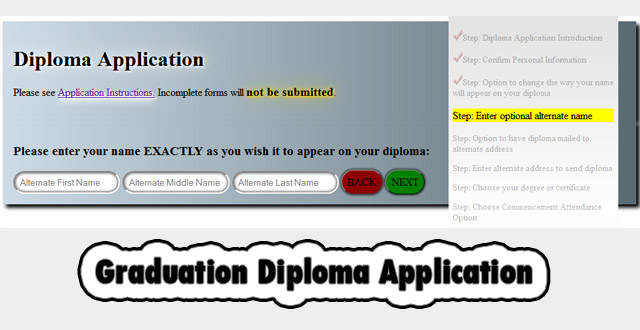
Here are some screenshots during development when I plug in my css styles library and call a few custom styles.


Screen shots of the diploma application with styles modified by plugging in my 3dw styles library.

Here are some screenshots of the finished product using styles provided by the marketing department.

3DW Tools CSS Styles Library

After three years of  designing proof of concept and rapid prototypes I have decided to compile all of my custom css styles that were spread between multiple projects into one master library of css style design patterns. My 3DW Tools CSS Styles Library is managed via my cms, and when included into a project,  grants  access to some really great styles that can be  called using an easy to remember  style language.

In order to produce HTML 5 designs without Flash or Photo Shop, my 3DW Tools CSS Styles Library is the perfect addition to a blank HTML 5 page or a  JQuery build, giving me the ability to design some really great mockups, proof of concept, rapid prototype, and user experience designs.

Here is the link to the visual reference.

Here is a css box shadow generator https://developer.mozilla.org/en-US/docs/Web/CSS/Tools/Box-shadow_generator

Here is a css button generator https://developer.cdn.mozilla.net/media/uploads/demos/m/o/mok20123/8aff6ca4f35726d64880dd6fc77739ba/css3-button-generato_1325474481_demo_package/index.html

Here is the css border radius generator https://developer.mozilla.org/en-US/docs/Web/CSS/Tools/Border-radius_generator

Working with dates and times in JavaScript

I need to get the current year and display it in a form. That way the form doesn’t have to be updated every year, just to change the date.

We always start with a date object, then use it to get what we need.

var today = new Date();
var theyear = today.getFullYear();
$("#theyear").html(theyear); // put the variable into a span with id of "theyear"

I would like to have a form that auto fills todays date in the following format: 2/27/2014

var currentTime = new Date();
var month = currentTime.getMonth() + 1;
var day = currentTime.getDate();
var year = currentTime.getFullYear();
document.write(month + "/" + day + "/" + year);

Here are great docs and examples from Mozilla

Upgrading Legacy Web Forms with my Content Display Wizard plugin.

Here is an example of how  my plugin makes it easy for the user to navigate and successfully submit the data. And for us weary developers, the best part is the AUTOMATION. My plugin will provide content navigation, client side validation and handle the submission of the data via ajax to my api.

At Skagit Valley College, I plug my wizard into a legacy form and it’s transformed into a slick responsive paperless web application for data collection. There was an old  Hall of Fame nomination form that had been moved into the cms of our new responsive version of the SVC site…


After simply including my Content Display Wizard Plugin, its now a slick paperless web application for data collection. Go check it out, go through the form to view the summary and I’m sure you will love the user experience.

How to Upgrade Your Samsung Galaxy Phone Episode 1 : Backup the phone data

 Click here to launch the podcast. Then, minimize that window and read this post to follow along.

Here are the step by step instructions for smartly upgrading your smart phone. An upgrade is a big deal. You could lose data, and even in rare cases your phone could stop working permanently. That’s called “bricking”, and you do not want to do that. Don’t worry, I will help you back up your data, and then upgrade your phone. ** if your phone is rooted, UNROOT before you upgrade or your phone  will brick!

Android Froyo 2.2 Operating System upgrade is now available for the SGH-i897 (Captivate). This update is only available by tethering your Captivate via a USB cable to a PC per the instructions below. Due to the large file size, the update is not available directly over-the-air to your phone.

Step: Get ready.
Here are the minimum requirements for upgrading your phone. Don’t begin this upgrade if you do not have everything.

COMPUTER

  • Desktop/Laptop Computer Running 32bit Versions Of Either Microsoft Windows 7, Vista, or XP
  • All Firewall & Anti-Virus Programs Should Be Disabled
  • Administrative Privileges Required To Download & Install Software Including Drivers
  • An Available USB Port On The PC That Supports 2.0 USB
  • Windows Media Runtime 11 (automatically installed by Kies Mini if not present)

PHONE

  • Fully Charged Battery

OTHER

  • USB Data Cable (Included In Retail Box)
  • Any Previous Samsung Kies Software Should Be Remove
Step: You must connect your phone to your pc

Connecting & Transferring

  1. Press the Home Key
  2. Plug the cable into the phone
  3. Plug the other end of the cable in a USB port
    • Tip: Avoid the use of multiport hubs if possible.
  4. When prompted, tap Mass storage
Depending on whether you have used  your phones mass storage before or not, you may need to configure the following screen(s)..otherwise you might need to slide down the top menu and choose “mount”..
    1.  Tap Connect USB storage

    1. Your PC will recognize your Phone as a Removable Disk. Click on Open folder to view files.

Step: back up your phone data

On your pc, you should go to the desktop, right click and create new folder. Name the folder with your initials, then “phone backup”, then todays date. My folder is named” DWD phone backup 08012011″. open the folder and adjust the window so it only takes up a small part of your screen.

When you have the window to your phone open, you will see a list of sub folders. Most important to a lot of people would be the photos taken with the phone. These are usually located in the DCIM folder under the Camera subfolder. The best way to be safe is to select all, right click, choose copy. Then click into your backup folder. right click , choose paste and prepare to wait for a few minutes for your data to back up.


Coming soon will be part 2: Upgrading the phone.
Dee Dubs Has A Solution To Intellectual Property Protection


The Distortion of Sharing

In the physical world, if you wanted to come over and listen to music  with me, you don’t have to buy a copy of the music.In fact, I could even give you the cds and movies that I bought, and you could take them home and use them whenever you want. But then, I wouldn’t have it. And that is where the term sharing has become distorted.  If I give the media to you, but I still have a copy that  moves beyond sharing to piracy. This has a huge impact in economics as well, according to the Recording Industry Association of America, with the music industry losing half of its profits in just one year. The two-chamber or “bicameral” setup of Congress operating on a standard envisioned in 1787,  is currently debating on this topic and how to combat this problem of online piracy and intellectual property theft. They have drafted a bill with  two sections: “Combating Online Piracy” and “Additional Enhancements to Combat Intellectual Property Theft.” The “Stop Online Piracy Act” (SOPA)  is still being debated in the House, with what seems like a large battle ahead of them.  This bill, as currently written, would give the U.S. Attorney General the power of disabling the  DNS (domain name server) records that point to suspect or illegal sites. A large number of security experts believe that the bill could disrupt the underlying architecture of the Internet. The Protect  Intellectual Property Act (PIPA).is SOPA’s Senate companion bill that is still in debate  in the chamber. is intended to combat “rogue” websites operated oversea but offers a wide spread power that will  affect people worldwide. This bill  has drawn so much opposition that most senators have withdrawn support and news sources such as Techspot.com are reporting that PIPPA has collapsed. I am opposed to the bills as written right now due to the ambiguity of the power and its usage. The adverse effects on the backbones of the Internet architecture are also a major concern. I believe the bills need re working and also software developers need to get more innovative when it comes to intellectual property rights and security. Come on application developers and investors, all these apps for whip noises and beer mugs when we need a good way to secure movies music and videos.

DeeDubs Has A Solution For Net Neutrality

Donald Denney
CS 101 Essay 2
3/18/2012

According to research I read at the New York Times, Net Neutrality is a way of classifying Internet access and the  web in its current state. They say that the entire Internet must  available to anyone with the desire to access it, on an equal basis. This is currently a hot topic in the media because of the legal battle between citizens and the large corporations backed by billions of dollars. The government is forced to deal with large corporations  who are spending hundreds of millions of dollars lobbying Congress to get rid of net neutrality. One problem lies with the type of information that is available. There is always a certain age for this movie or that game. Its a way of feeling that we are helping people who can’t use their own judgement about what information to access. With identity theft, child porn and sexual predators rampant, the way the Internet is presented to an end user must be monitored and distributed to the user as seen fit by some kind of standards. Opposition say  to leave it to the family to monitor and secure their families internet access, but much like guns, booze, drugs and porn, there must be some kind of organized prevention continuously looking after the greater good. Perhaps new standards of surfing the web with credentials of some kind to verify age and identity could be a valuable tool for law enforcement, parents and educators. On the other hand, Net Neutrality is essential when it comes to large corporations limiting the flow of data, and access speeds of all sites but their own, for power and profit. An article on Free Press.com can be summarized by saying that reliable and high speed access to  the free internet is the only way for developers all over the world to continue to contribute to new technology , software, and applications .  The consequences of losing Net Neutrality would be devastating.Large corporations would take over, choices would be eliminated and life would be driven by decisions made in a corporate boardroom. We must continue to fight for and support the Internet Freedom Preservation Act of 2009 to  safeguard the future of the open Internet and protect Internet users from discrimination online.

Technical Instructions: How to use smart phone as portable flash drive

Donald Denney
2/16/2011

How to use your smart phone as a smart  solid state storage device.

These instructions are for experienced users who have file management skills and a thorough knowledge of connecting devices to a computer. This is an advanced method of file storage and transportation.

Introduction

Most students have the need to transport files. Storing them on a flash drive is one of the most common methods of file storage and transportation. However, there are many problems associated with using a flash drive. Flash drives are not secure, and  are very easy to lose. Carrying multiple devices around is inefficient. “Smart Phones” come with ample storage, can hold your files  and interact with computers easily.

Tools For this project, you will need: A “Smart Phone”, USB cord, Personal Computer. All of these should not be more than a few years old, or they won’t have the proper firmware, software and file transfer protocol installed. Steps

  • The first step is to figure out if your phone will work for this purpose. If your phone came with a USB cord for connecting to computers, then it should work. Also, if the phone uses external memory card storage, then it has a good chance of working for this purpose.
  • The second step is to connect the USB cable to your phone. Carefully insert the correct end into the proper slot on the phone. Use extreme caution not to insert the cable improperly, and don’t use too much force or you can permanently damage your device.
  • The third step is to connect the other end of USB cable to your computer. If you have a choice, use the High Speed USB port usually located toward the front of most computers. If you don’t have a choice then just use whatever port is available.
  • The fourth step is to wait while Windows recognizes your device. Sometimes this can take quite a while. If you are prompted, answer the prompts using your desired settings. You shouldn’t need to install any software from CD or the Internet. Windows comes standard with the default drivers you will need.
  • The sixth step is to navigate to the folder where you will store your files. From “My Computer”, a new drive letter will appear in the same manner as when a flash drive is inserted.  Navigate into the drive, and choose a location for your files.
  • The final step is to transfer your files. Copy and paste, or save the file  from your favorite application  directly onto your phone flash drive.

Conclusion The phone can be a wonderful file storage medium, and it is a lot more convenient than using a separate flash drive. The benefits of having your files with you wherever you go are plentiful, including knowing they are secure, having the latest version of a file, and always knowing who has access to your files. As new phones are released, they are packed with features that make it easy to use as file storage for music, videos and documents.