There are some exciting and powerful things I can do.
echo date(‘l jS \of F Y h:i:s A’);
outputs similar to : Thursday 30th of July 2015 06:43:56 PM
There are some exciting and powerful things I can do.
echo date(‘l jS \of F Y h:i:s A’);
outputs similar to : Thursday 30th of July 2015 06:43:56 PM
I miss working in flash 5. It was a great development environment. It bridged the gap between visual art and code art. Allowed some creative and exciting user interaction. For the next gen it will all be about css and html 5. I am devving some “TimeLines” , “Movie Clips” and some “Stages” for creating stuff. Here is the “Stage” template: stage
Here are some prototypes of a “Movie Clip” made from jpg series. Bubbles
Here is a comparison of image series rendered in flash, and using my “Movie Clip” and “Timeline” prototypes
Here is a cross browser solution to allow the user to press a button and print out the contents of an element. Suppose we have a content area with an id of “mycontentarea”, and a button that says “print”. We can attach a handler to the click event and run this code in the function to print out the contents of “mycontentarea”:
[code]
w=window.open();
reportinfo = document.getElementById(‘mycontentarea’);
w.document.write(reportinfo.innerHTML);
w.document.close();
w.print();
w.close();[/code]
The CSS specification for transform allows for some great things. For example i have this image that I created sideways (on purpose lol), but i want to use it in a different instance right side up. with css i can put:
[code language=”css”]
style=’transform: rotate(-90deg);’
[/code]
I will write some more great examples of css transformations soon.
There are some great things you can do with the css text- shadow property.
Here is a cool stamped text effect using a background and a text shadow in combination.
Give your background element a grey background color, and give the text a white shadow.
[code language=”css”]
#stampedtext{
display:inline-block;
background-color:grey;
}
#stampedtext h1 {
text-shadow: 0px 1px 1px white;
color: black;
} [/code]

Here is a css menu playground with some great css menu ideas: menuandlayout1
Here is css div styling and transformation playground: demo

As complex paperless forms become full fledged web applications, there is a growing need for automation such as having a form available to be used from a certain date/time range. For example, a health insurance sign up that opens on December 1 at 9:00 AM and closes on December 24th at 5:00pm Pacific Time. We want these times to be hard coded for the server, in case the users are from different time zones, we want everyone to be able to sign up at exactly the same server time, regardless of their location. So if they were from New York, they would be open to sign up at 3pm December 1st, etc….
We need a few variables.
open_date – the date / time that the form will open
close_date – the date / time that the form will close
today_date_server – the current date/time of the servertoday_date_user – the current date/time of the users machine.
user_time_difference – the difference between the users time and the servers time. this could be used to display correct messages about when the user can sign up.
openorclosed – this will be set by the logic then used to display the correct messages and ui views
closedmessage – this will be a spot for the special message that will display to the user when the form is closed.
So now that I have my variables set up, lets put them to use. I will compare the dates and make sure that today is within the form opening range. Then I will set the openorclosed variable to open or closed based on the results. The I will update the ui view according to the openorclosed variable.
Here is the final form opening and closing automation logic in VbScript:
open_date = "9/2/" & year(NOW) & " 09:00 AM"

close_date = "10/14/" & year(NOW) & " 05:00 PM"

today_date_server = NOW()

datediffopen = DateDiff("n",today_date_server, open_date)

datediffclosed = DateDiff("n", today_date_server, close_date)

If datediffopen < 0 and datediffclosed > 0 Then

openorclosed = "open"

Else

openorclosed = "closed"

End If
This will automatically open and close the form to the users every year. Hooray for Automation!
Now I can manipulate the ui view using the variables, so the user will know when the form is open and why its closed.
[code language=”vb”]
If datediffopen > 0 and datediffclosed > 0 Then
‘display message for before the form has opened for the year.
openorclosedmessage=”The nomination form will be open from ” & open_date & ” to ” & close_date & “. Please submit your nominations between this time period for them to be considered.”
ElseIf datediffopen < 0 and datediffclosed < 0 Then
‘display message for after form has closed for the year.
openorclosedmessage=”The nominations were due by ” & close_date & “. The nominations are over for the ” & year(NOW) & ” year. The nomination form is closed.”
End If[/code]
To display the date and time in a user friendly format – Tuesday, October 14, 2014 at 5:00:00 PM – use the FormatDateTime function:
[code language=”vb”]FormatDateTime(close_date, 1) at FormatDateTime(close_date, 3)[/code]
To debug the automation code, use this snippet:
[code language=”vb”]
‘ this message is for de bugging the open / close automation
closedmessage = closedmessage + “<p class=’redtext boldtext’>Today is ” & today_date_server & “. The form will open on ” & open_date & ” and close on ” & close_date & “. Is today inside the date range?” & isitopenorclose & “. The date dif open is ” & datediffopen & “. the date diff closed is ” & datediffclosed & “</p>”
[/code]
Now I would like to take this a bit further, by having the form open on the first Monday of January, and close on the last Friday of January. Here is the algorithm I have come up with:
[code]
mydate = “1/1/” & year(NOW) & ” 9:00 AM”
dtmDate = CDate(mydate)
daycounter = 1
Do While daycounter <= 7
‘ response.write(Weekday(dtmDate) & ” is the weekday for ” & dtmDate & “<br/>”)
If Weekday(dtmDate) = 2 Then
response.write(“<br>The form will open on ” & FormatDateTime(dtmDate, 1))
Exit Do
End If
daycounter = daycounter + 1
dtmDate = dtmDate + 1
Loop
daycounter = 1
Do While daycounter <= 31
‘response.write(“<br />” & Weekday(dtmDate) & ” is the weekday for ” & dtmDate & “<br/>”)
If Weekday(dtmDate) = 6 Then
thelastfriday=dtmDate
End If
daycounter = daycounter + 1
dtmDate = dtmDate + 1
Loop
response.write(“<br>The form will close on ” & FormatDateTime(thelastfriday, 1))
[/code]
For the year 2014, the result will display:
The form will open on Monday, January 06, 2014
The form will close on Friday, January 31, 2014
Now I can drop this into my forms that will open in the pattern of first Monday, and close on last Friday of January.
Due to the strict Web Content Accessibility Guidelines for institutions that serve public internet content to users around the world, I am updating some legacy apps to use a date picker to allow user to enter their birthdate. After some research I’ve decided that the jQuery UI datepicker would be the perfect thing to use due to its ability to work in almost every browser that exists.
The first thing I will do is to read the docs at jQuery official site. Now that I have a good understanding of the scripts and code involved, lets break down the minimum requirements to have this working in a page.
I would want the user to click into the text field…
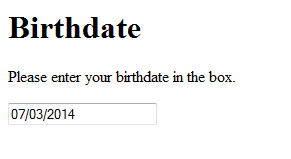
…and have the picker pop up, with drop downs to choose the month and year…
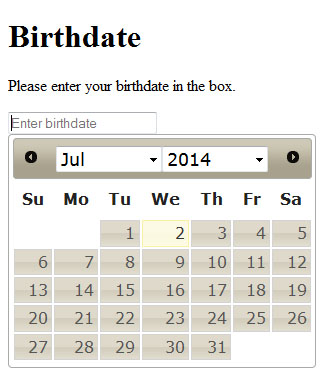
…then they click to chose the day.
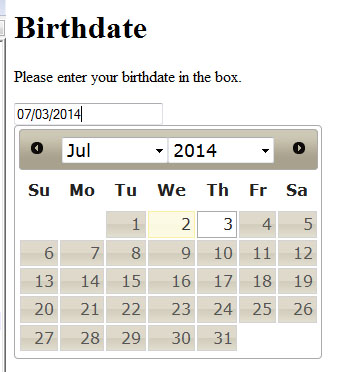
The audience for this user case scenario are adults of an age to be interested in information about college. The device target includes desktop and laptop computers. Mobile devices have native form controls that would conflict with this script.
We start with my html 5 template, then add the calls to the google cdn to get the jquery plug in scripts.
[code language=”html”]<script src=”http://ajax.googleapis.com/ajax/libs/jquery/1.11.1/jquery.min.js”></script>
<link rel=”stylesheet” href=”http://ajax.googleapis.com/ajax/libs/jqueryui/1.10.4/themes/smoothness/jquery-ui.css” />
<script src=”http://ajax.googleapis.com/ajax/libs/jqueryui/1.10.4/jquery-ui.min.js”></script>[/code]
Next we have a form with a date element, given proper name and id attributes.
<form><input type="date" id="mydatefield" name="datefield" value="" placeholder="Enter birthdate" /></form>Now, all I have to do is call the jquery date picker function on the form element, with options changeMonth and changeYear setup as so…
$( "#mydatefield" ).datepicker({ changeMonth: true, changeYear: true, yearRange:"c-80:c" });That’s all there is to it. While testing on the desktop, it is working well in Chrome, Firefox and Internet Explorer.
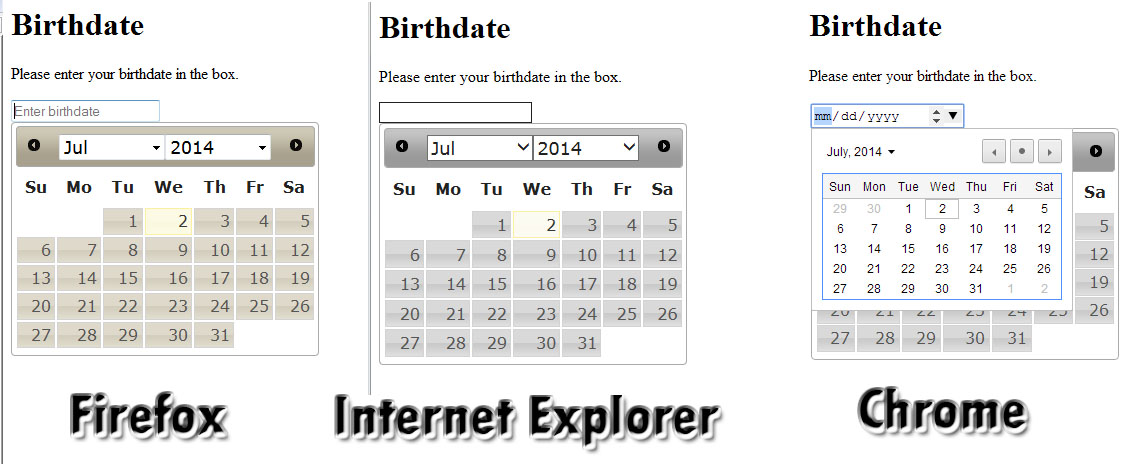
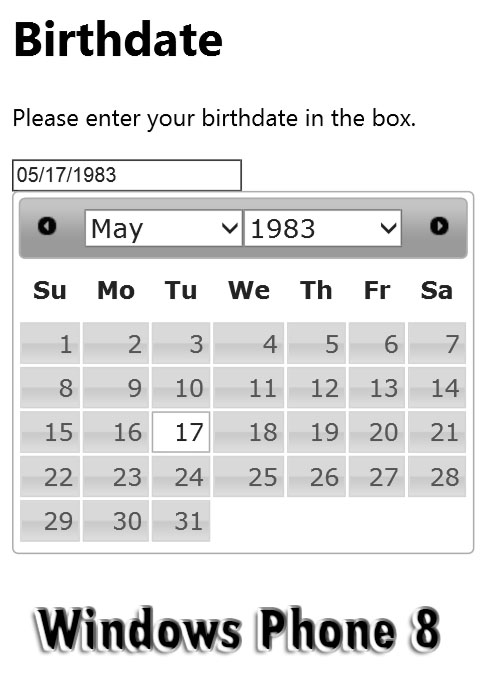
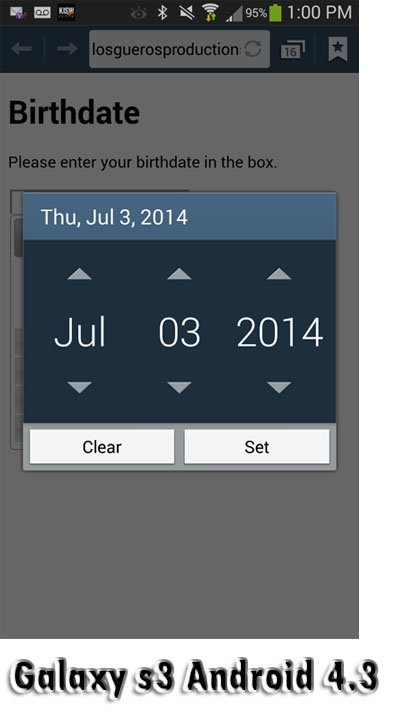
To avoid the problems of overlayed natives on mobile devices , We just use a “text” input instead of the html5 “date” input element. We can easily use CSS media queries JavaScript to change the data type on the fly.
According to the Microsoft Docs, The InStr(string1, string2) function returns the position of the first occurrence of one string within another.
We can use this to find a string within another one. For example. I wish to see if an email address is from the Skagit.edu domain. I want to see if the address is firstname.lastname@skagit.edu so I can use the first and last name in a greeting.
string1=”@skagit.edu”
string2=”firstname.lastname@skagit.edu”
stringcount = InStr(string1, string2)
If stringcount>0 Then
response.write(“We have a skagit.edu domain address”)
Else
response.write(“This is not a skagit.edu email address”)
End If
I need a server side check for basic email address syntax. I will use a regular expression to match the pattern of xxxxx@yyyyy.zzz
 Function GetEmailValidator()
      Set GetEmailValidator = New RegExp
      GetEmailValidator.Pattern = "^((?:[A-Z0-9_%+-]+.?)+)@((?:[A-Z0-9-]+.)+[A-Z]{2,4})$"
      GetEmailValidator.IgnoreCase = True
End Function
This is a great function, but how to use it? Well, you test it like so:
Dim EmailValidator : Set EmailValidator = GetEmailValidator()If EmailValidator.Test(to_email) = False Then ..... execute code for when an invalid email is foundhave a table that is created dynamiclly. need to see if its there, create it or append to it based on its existence.
Lets set a var usertableexists=false;
if($(“#mytableid”).length){usertableexists=true;}
console.log(“the table exist var is “+ usertableexists)