The ability to split a string is a common feature in programming. The way to implement this in c# is a bit different than most languages.
We have a string such as:
string myVars = “var1, var2, var3, var4”;
We need to split this string into an array of individual variables. That’s where our String.Split() method comes into play. Its pretty easy once you know the syntax. The Microsoft docs don’t mention this way:
string[] myArray = myVars.Split(‘,’);
The key is the single quotes around your delimiter in the split method.
If the Financial Aid Department is the heart of the college institution, then the Skagit Valley College was suffering from a stroke. The heart was clogged up from the result of years of managing paperwork using tried and true ancient techniques: the in person delivery of hand filed paper forms.
And then corona virus came to deliver the death blow. Due to the pandemic, the college campus was forced to close. Unable to allow students to come to campus and process in person financial aid meant that our college might suffer the same fate as several other Washington State institutions and be shut down completely.
They came to me with this problem desperate for a solution. They needed a document repository that could be integrated with our current Legacy student management system data, but that will also be able to transition with our data over the next few years as the school completes its move to a new student data management system. They needed a way to assign the forms to the students, and a portal where students could securely upload their documents.
The college had a legacy document storage system in place, aging and in need of replacement. The system had fallen out of development and was no longer being supported. The decision was to either purchase an expensive out of the box system, or develop one in-house. Due to the success of previous projects, the President of SVC decided to have me develop a custom in-house document storage and management solution that would be easily integrated into our student data management system.
During the planning phase, the project management documents were drawn up, key deliverables determined, and the use case scenarios developed.
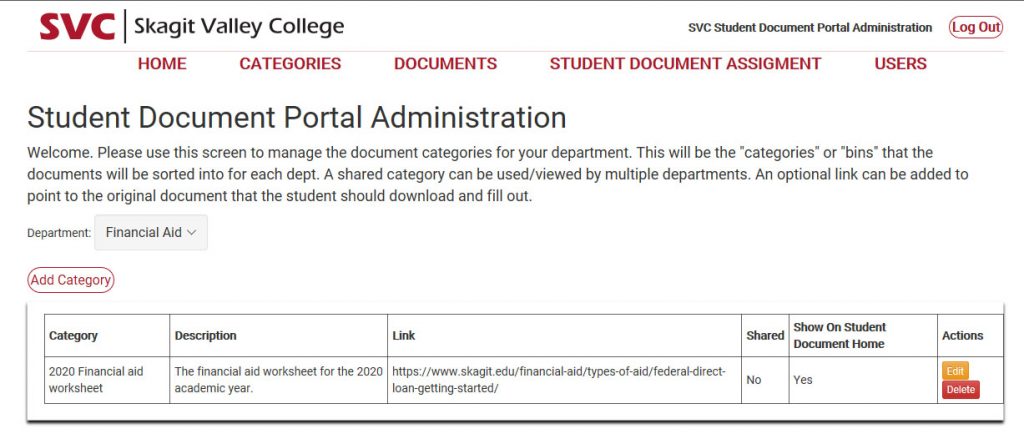
A screen shot of the student document repository user interface.
Throughout the software development life cycle, those documents were referred to in order to prevent feature / scope creep from setting back the projected completion date. Using Agile project management I completed several sprints of user story backlogs, and the scrum retrospectives revealed valuable lessons learned about the techniques used to program the application.
In the midst of the pandemic, forced into working remotely, I was under the pressure to save the college by finishing my application well ahead of the projected schedule.
The project close was met with very satisfied stake holders, and the project sponsor was happy to sign off the completed product.
Call to c# api using ajax and recieve an array of variables in JSON format.
javascript call to api: In aspx page, you can access a posted in variable such as an id…
const NewsID = ‘<%=Request.Form[“NewsID”]%>’;
… then call to api and get record from that id…
 $.ajax({
type: 'POST',
url: 'update.aspx/loadRecord',
data: JSON.stringify({ NewsID: NewsID }),
contentType: 'application/json; charset=utf-8',
dataType: 'json',
success: function (msg) {
var obj =  jQuery.parseJSON(msg.d)
console.log("I have successfully called to the api.");

 // set the heading value
 $("#Heading").val(obj.Heading);
 // set the body value
 $("#Body").val(obj.Body);
}
});
The C# api receives the record id and returns a record…
... call to database and get record ...

var message = new {Heading=Heading, Body= Body};
return JsonConvert.SerializeObject(message);
Many times you have data in a format that needs to be parsed. One thing I have come across lately is needing to get a value from between parenthesis.
Data: Here is my description and it has a code.(1234)
I need to get the code of 1234 from the data.
string value = "Here is my description and it has a code.(1234)";
int startIndex = value.IndexOf('(');
int endIndex = value.IndexOf(')');
int length = endIndex - startIndex;
if (startIndex > -1 && endIndex > -1)
{
return value.Substring(startIndex + 1, length-1);
}
else   return "There are no parenthesis in the value.";
While devving an app on localhost, the email scripts error out and you cant test what the message would have looked like. With this handy snippet, you can dump any email from your app into a local directory. Slap this into your dev web config file.