Make a calendar date picker using jquery

Due to the strict Web Content Accessibility Guidelines for institutions that serve public internet content to users around the world, I am updating some legacy apps to use a date picker to allow user to enter their birthdate. After some research I’ve decided that the jQuery UI datepicker would be the perfect thing to use due to its ability to work in almost every browser that exists.

The first thing I will do is to  read the docs at jQuery official site. Now that I have a good understanding of the scripts and code involved, lets break down the minimum requirements to have this working in a page.

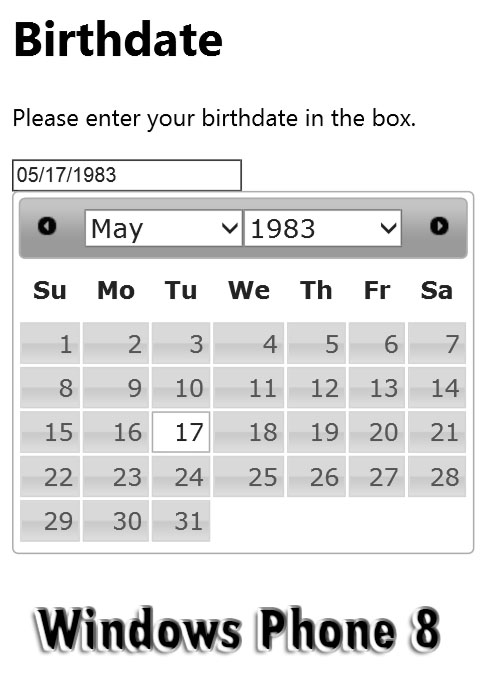
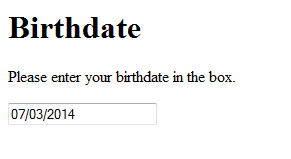
I would want the user to click into the text field…

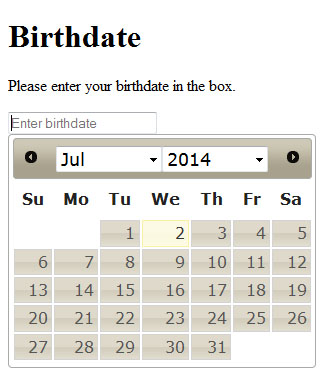
…and have the picker pop up, with drop downs to choose the month and year…
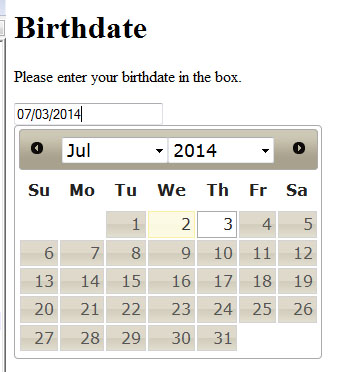
…then they click to chose the day.
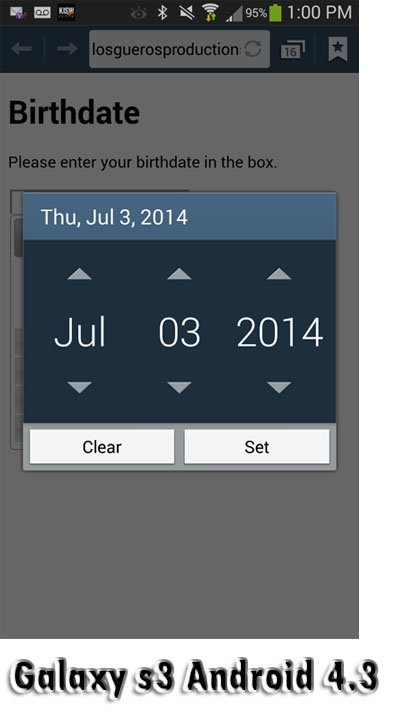
The audience for this user case scenario are adults of an age to be interested in information about college. The device target includes desktop and laptop computers. Mobile devices have native form controls that would conflict with this script.

We start with my html 5 template, then add the calls to the google cdn to get the jquery plug in scripts.
[code language=”html”]<script src=”http://ajax.googleapis.com/ajax/libs/jquery/1.11.1/jquery.min.js”></script>
<link rel=”stylesheet” href=”http://ajax.googleapis.com/ajax/libs/jqueryui/1.10.4/themes/smoothness/jquery-ui.css” />
<script src=”http://ajax.googleapis.com/ajax/libs/jqueryui/1.10.4/jquery-ui.min.js”></script>[/code]
Next we have  a form  with a date element, given proper name and id attributes.

<form><input type="date" id="mydatefield" name="datefield" value="" placeholder="Enter birthdate" /></form>

Now, all I have to do is call the jquery date picker function on the form element, with options changeMonth and changeYear setup as so…

 $( "#mydatefield" ).datepicker({ changeMonth: true,   changeYear: true, yearRange:"c-80:c"  });

That’s all there is to it. While testing on the desktop, it is working well in Chrome,  Firefox and Internet Explorer.
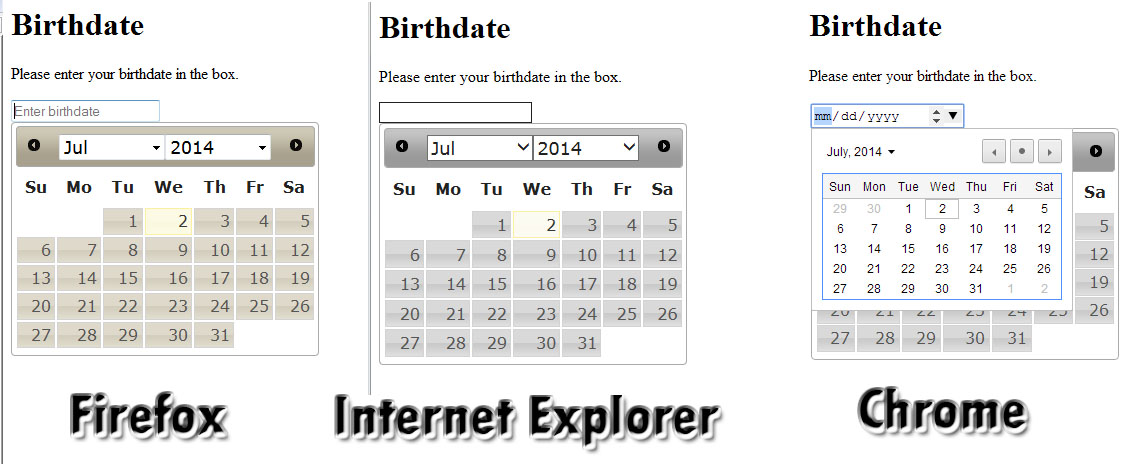
To avoid the problems of overlayed natives on mobile devices , We  just use a “text” input instead of the html5 “date” input element. We can easily use CSS media queries JavaScript to change the data type on the fly.

Find text in a string, compare two strings for similar match VBScript ASP classic

According to the Microsoft Docs, The InStr(string1, string2)  function returns the position of the first occurrence of one string within another.

We can use this to find a string within another one. For example. I wish to see if an email address is from the Skagit.edu domain. I want to see if the address is firstname.lastname@skagit.edu so I can use the first and last name in a greeting.

string1=”@skagit.edu”
string2=”firstname.lastname@skagit.edu”

stringcount = InStr(string1, string2)

If stringcount>0 Then
response.write(“We have a skagit.edu domain address”)
Else
response.write(“This is not a skagit.edu email address”)
End If

Basic Email Validation With VBScript / ASP classic

I need a server side check for basic email address syntax. I will use a regular expression to match the pattern of xxxxx@yyyyy.zzz

 Function GetEmailValidator() 
      Set GetEmailValidator = New RegExp 
      GetEmailValidator.Pattern = "^((?:[A-Z0-9_%+-]+.?)+)@((?:[A-Z0-9-]+.)+[A-Z]{2,4})$" 
      GetEmailValidator.IgnoreCase = True 
End Function 

This is a great function, but how to use it? Well, you test it like so:

Dim EmailValidator : Set EmailValidator = GetEmailValidator()
If EmailValidator.Test(to_email) = False Then ..... execute code for when an invalid email is found

detect object in dom jquery see if a table exists on html5 page by id

have a table that is created dynamiclly. need to see if its there, create it or append to it based on its existence.


Lets set a var usertableexists=false;

if($(“#mytableid”).length){usertableexists=true;}

console.log(“the table exist var is “+ usertableexists)

Job History: Information Technology Developer

I would like to begin by describing how I worked my way up to my current position of I.T. Developer at Skagit Valley College. I started working at the help desk assisting students with log-ins and computer issues. During some downtime my supervisor, Benjy, decided to test out my Web Assistant skills. I seemed to have a natural talent for editing the web pages and Benjy saw my potential, so he put me to work doing Web Assistant tasks. I began to develop what Dr. Coorough, the MIT department chair, has said are rare talents: the ability to learn HTML, CSS, Javascript, and pretty much any other programming language. I can also do most everything multimedia related such as graphics, video production, printing, and Flash. As a technician, I can solve technical support issues, hardware upgrades and application installation. I was doing such a good job that I was asked to be hired on part time as an IT developer. Benjy moved me from the help desk down the hall into an office with him, and we set to work designing the first Paperless Progress Reporting System for the college. I began by creating the Information Architect Documents. After thorough documentation and planning I began to implement my designs by hand coding using a relatively new technique called Model View Controller. This is very different than a standard webpage, and even a normal web application is not the same as an MVC web application. The MVC technique of coding is very powerful and allows me to perform complex operations from a web page interface. Benjy and I put that power to use in the form of converting an age old paper progress reports system into a paperless progress reporting system.

Job History: Property Management

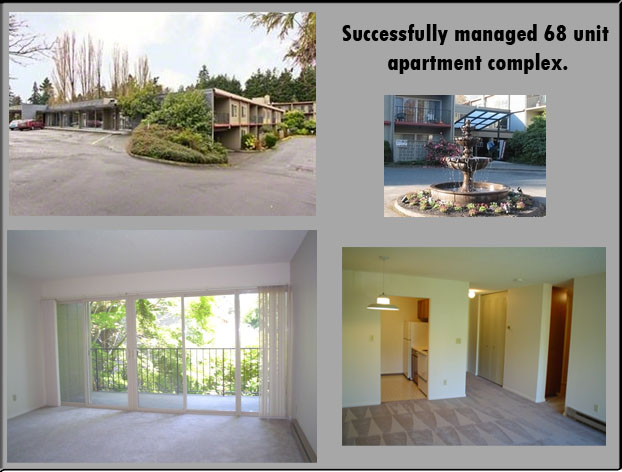
Successfully managed 68 unit apartment complex. Responsible for advertising and renting empty units, collection and recording of rent, coordinating move-outs and move-ins, customer service and tenant relations. Responsible for rapid turnover of move outs including cleaning, painting, maintenance, repair and  remodeling of units. Routinely perform grounds keeping, landscaping, building upkeep, and preventative maintenance of entire premises including outdoor lighting, automated sprinkler system, security entrances, elevator. Conducted weekly inventory reports and ordered parts/supplies.

Notable achievements include keeping complex full with a waiting list, modernizing units with new appliances, fixtures and accessories. Responsible for unit turnovers and emergency maintenance with skills including custom carpentry, counter tops, cabinets, major remodeling, installation of appliances, hot water tanks, plumbing, electrical, drywall repair, texture and paint.

Include letters of reference from tenants.

Western Homes http://westernhomesapts.com/

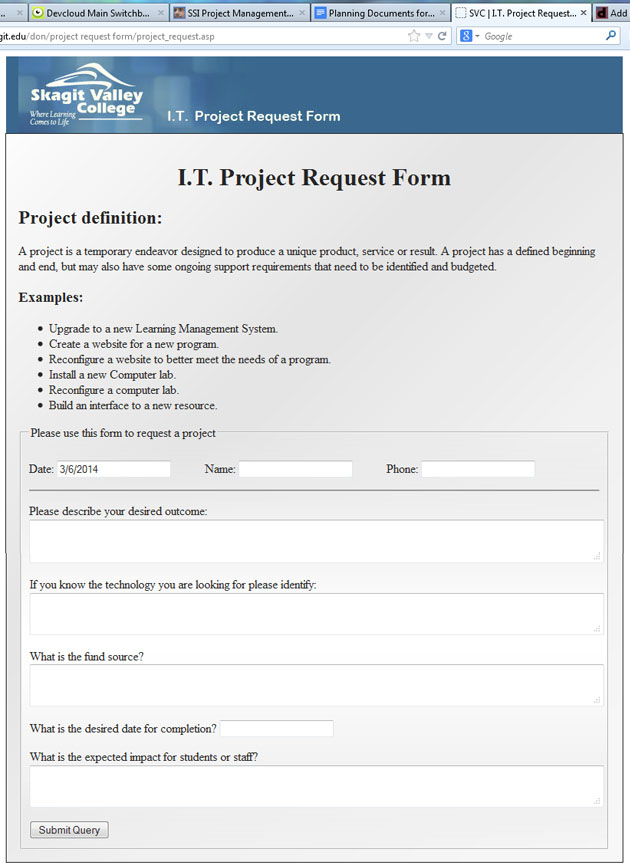
I. T. Project Request Form

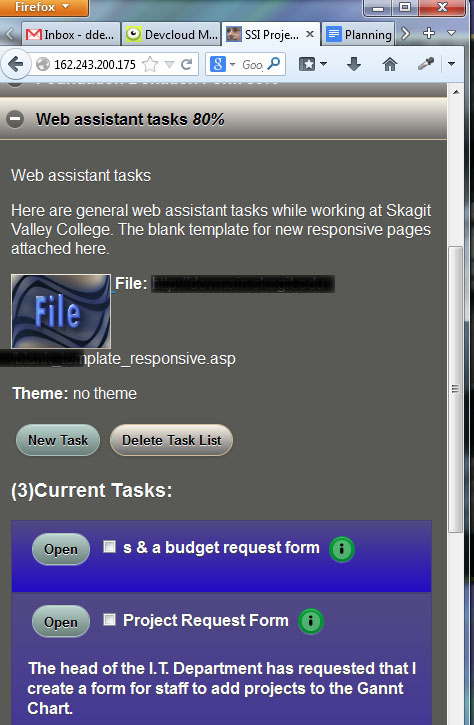
The head of the I.T. Department at Skagit Valley College asked me to convert the paper form that was used for submitting an I.T. Project Request. I used my 3DW DevCloud Tools to whip out this project in a small amount of time. My project management cloud is the perfect way to track and complete this project. As you can see from the tabs in the screen shot, I’m logged into my DevCloud, and have my task lists, notes and planning documents right at my fingertips. These powerful tools allow me to compete projects quickly and efficiently, using the best practices and techniques I have honed through the years of web application development at Skagit Valley College.

Job History: Crab Fishing Process Foreman

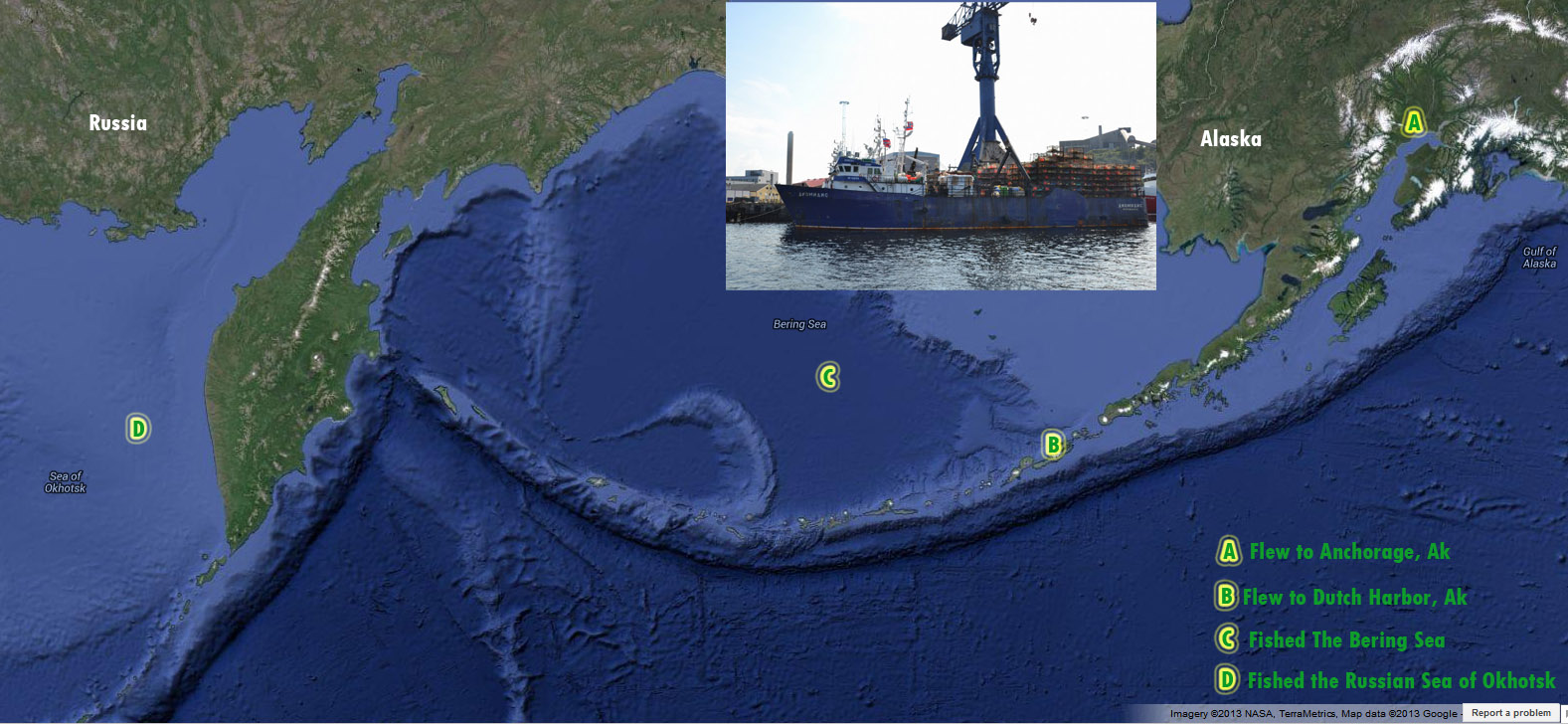
I flew to Anchorage, Alaska then took a small plane to Dutch Harbor.  I went on board the Diomedes, a Russian owned crab fishing and processing vessel. We were the only boat allowed to fish in the Russian Sea of Okhotsk. During 6 months at sea, I became experienced in pulling crab pots with live crab using the Hansen Hauler hydraulic system and sorting male/ female and legal sized crab. Skilled at baiting crab pots on deck of vessel. Experienced in all phases of seafood processing and packing including butchering, cooking, and packing of crab. Also including freezer on and off loading of finished product and supplies. Promoted to process foreman in charge of 13 men and responsible for additional duties included  quality control, cooking and freezing of product, and maintaining processing equipment.

Job History Of Final Detail Cleaning Foreman

In charge of final detail cleaning of new construction projects. Promoted to foreman in charge of leading cleaning crews from 13-22 men on large scale projects to government standards.

One Pacific Tower – 2000 1st Avenue, Seattle, WA 98121

Lead cleaning crews of up to 22 men to provide final detail cleaning for turnover completed project to owners. One Pacific Tower is a 27-story luxury tower on 1st Avenue on the edge of Belltown and Downtown Seattle just 2 blocks from Pike Place Market. The affluent 27-story tower features a 24-hour concierge, indoor pool, guest suite, club room and 80 units which boast expansive western views.

Everett Navy Exchange
Lead 13-22 men crews to final detail clean the entire 60,000 sq ft mall after 18 months of construction. The amenities included full size auto repair shop,  hair salon, dry cleaners, food services, retail sales, large restrooms, and 1000’s of square feet of windows. This was an enormous project to manage, and even back then I used a computer to come up with solutions to time, project and staff planning and management.

Ford Golf Classic Online Registration Form

Since 1989, Ford Golf Classic funds have provided financial assistance to thousands of SVC students of all ages. I am proud to have been chosen to create and maintain a paperless form for sponsors to register and pay for the event. I created the user interface using  responsive HTML5, JavaScript, JQuery.  On the back end, the web application is using my API written in ASP to talk to SQL Server. I used automation algorithms to have the form open and close at appropriate times. I have used responsive disclosure and live view error reporting to guide user through the registration and  ensure a great user experience.

My process to create this kind of paperless application is derived from the Model View Controller programming model. I start by outlining the tasks in my project management cloud, setting myself up for success with a clear roadmap toward the well defined end goals.

The next step is to create the I/A Documentation:

Then I develop the UI view and the application logic following the plans I have created.

The final stage is to run all of the user stories and case scenarios, noting and fixing any problems discovered by the tests.